SPARQL basics
This is the classic introductory SPARQL tutorial from SPARQL playground, SIB’s original standalone training tool, brought over here so it runs the same way as the rest of this site: every query below runs directly in your browser, against one small example dataset you can see (and edit) right in the page.
Scenario
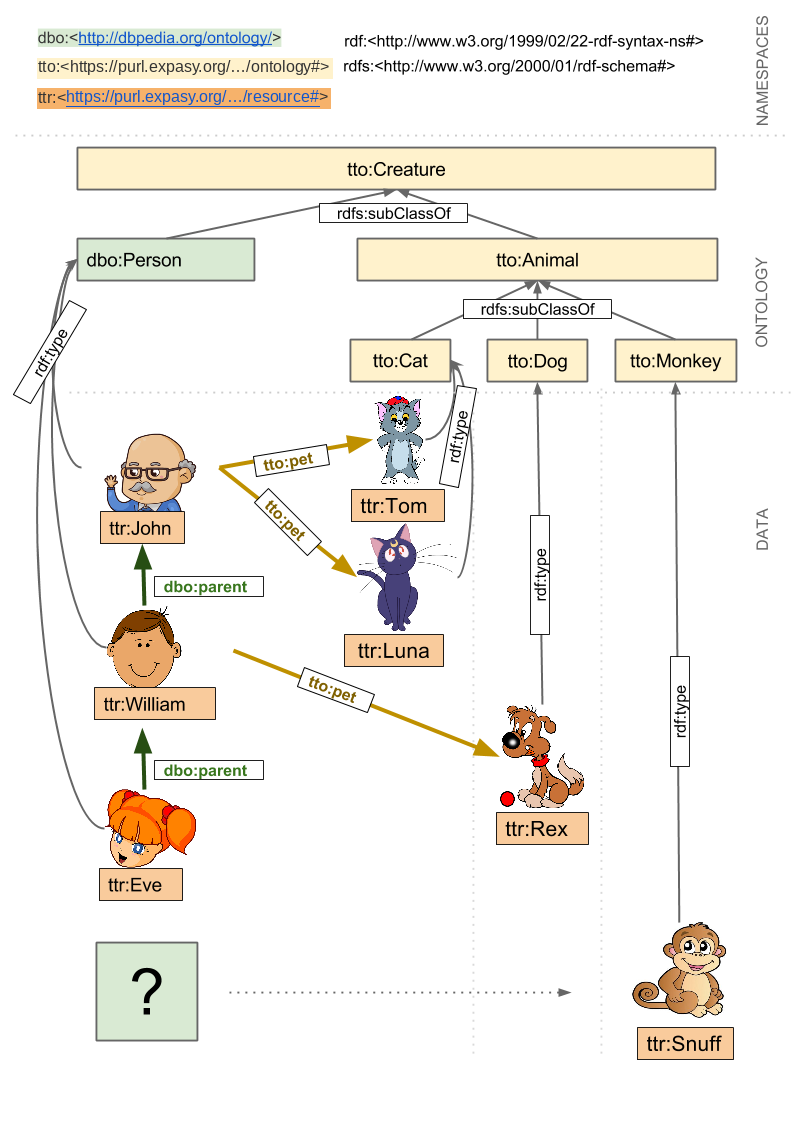
This example contains a very simple dataset about persons and their pets.
The diagram below shows the main resources it contains (a simplified view - every triple can be seen in the example data box further down, and in the diagrams below).
Ontology
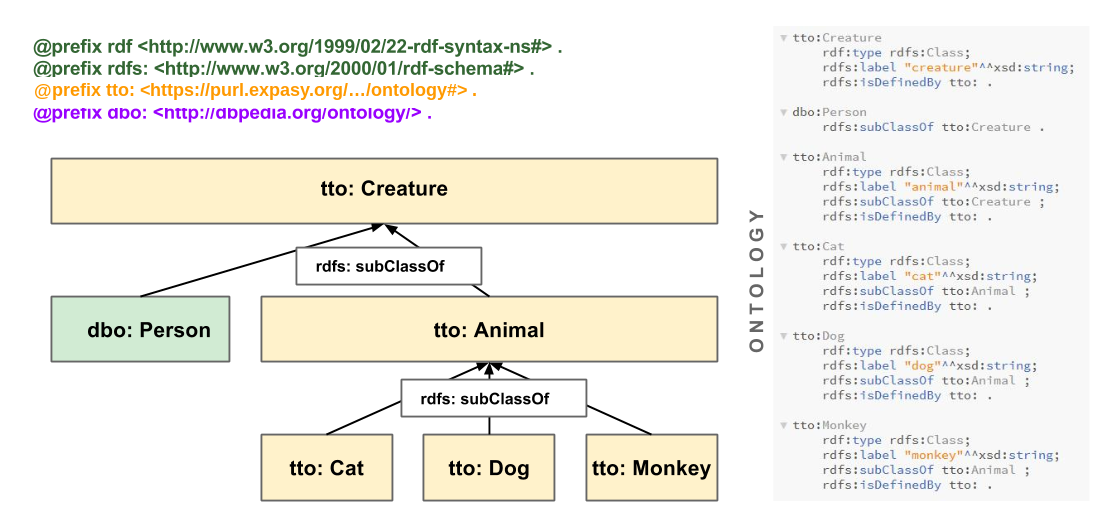
A quick look at how the classes and properties in this example are modeled - useful background before diving into the queries, and a reasonable pattern to follow in your own data.
Classes
A class should be defined with rdf:type rdfs:Class (or owl:Class).
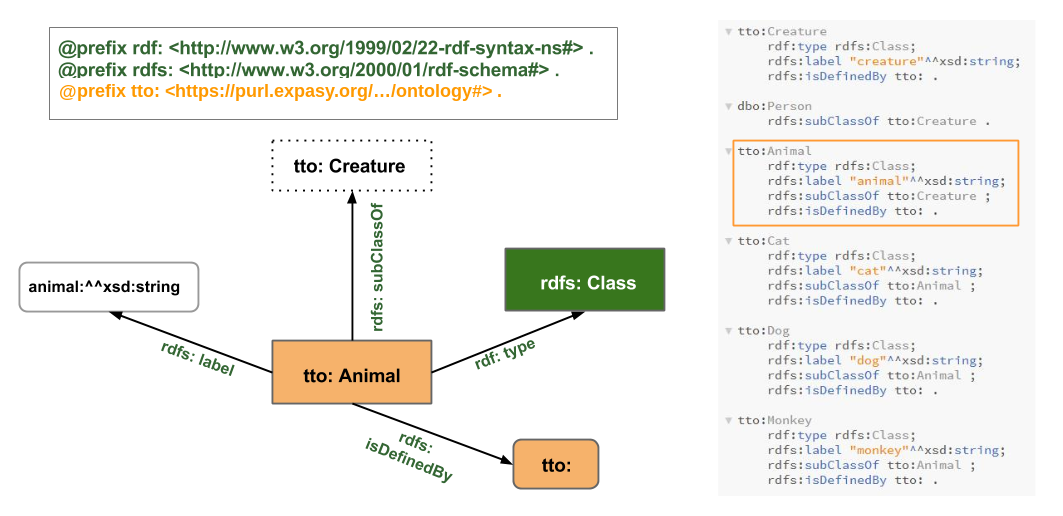
Here is the tto:Animal class in detail:
Properties
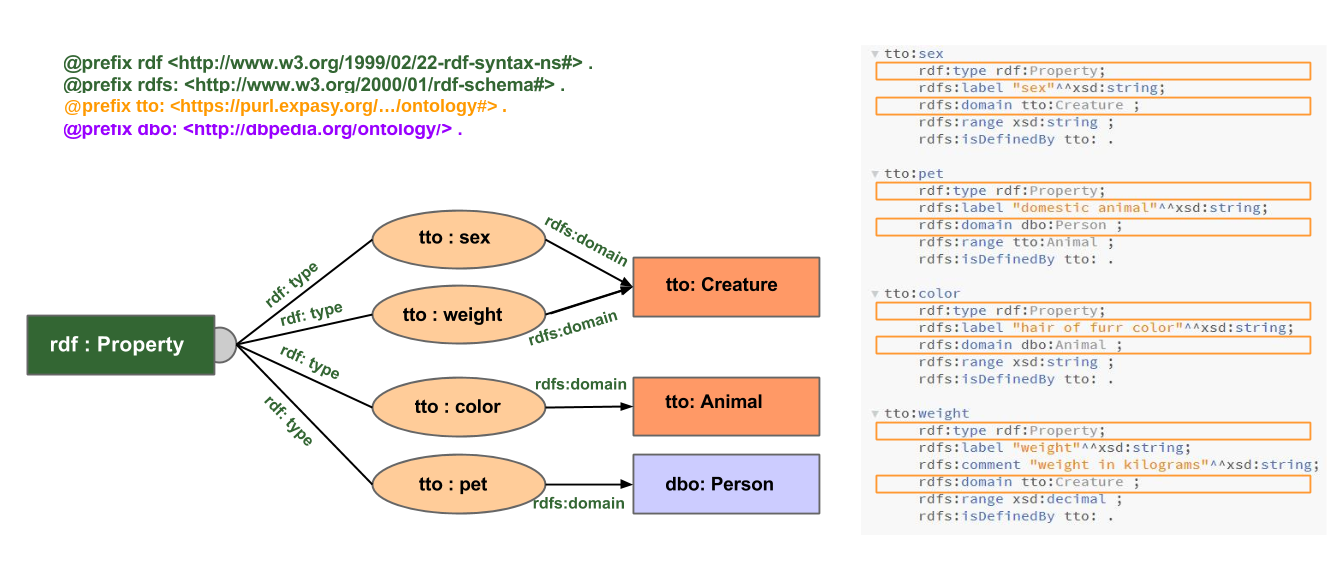
Properties are attached to their domain with rdfs:domain - it’s also good practice to attach them to their rdfs:range.
The example data
Every query on this page runs against the dataset below - the same ontology and data shown in the diagrams above, combined into one file. It’s editable: change it, then re-run (or re-open the graph view for) any query further down the page. A couple of the exercises below will specifically ask you to do that.
The tto:/ttr: terms used here have real, dereferenceable identifiers under https://purl.expasy.org/sparql-examples/training/ - fetch .../ontology or .../resource with an Accept: text/turtle header (or just open default/ontology.ttl / default/resource.ttl in this repository) to get the same two files as plain Turtle, split the way the original SPARQL playground source had them.
Example data (Turtle) — edit it, then re-run any query below
@prefix xsd: <http://www.w3.org/2001/XMLSchema#> .
@prefix rdf: <http://www.w3.org/1999/02/22-rdf-syntax-ns#> .
@prefix rdfs: <http://www.w3.org/2000/01/rdf-schema#> .
@prefix dbpedia: <http://dbpedia.org/resource/> .
@prefix dbo: <http://dbpedia.org/ontology/> .
@prefix dbp: <http://dbpedia.org/property/> .
@prefix tto: <https://purl.expasy.org/sparql-examples/training/ontology#> .
@prefix ttr: <https://purl.expasy.org/sparql-examples/training/resource#> .

# - - - - - - - - - - - - - - - - - - - - - - - - - - -
# Classes
# - - - - - - - - - - - - - - - - - - - - - - - - - - -

tto:Creature
	rdf:type rdfs:Class;
	rdfs:label "creature"^^xsd:string;
	rdfs:isDefinedBy tto: .

dbo:Person
	rdfs:subClassOf tto:Creature .

tto:Animal
	rdf:type rdfs:Class;
	rdfs:label "animal"^^xsd:string;
	rdfs:subClassOf tto:Creature ;
	rdfs:isDefinedBy tto: .

tto:Cat
	rdf:type rdfs:Class;
	rdfs:label "cat"^^xsd:string;
	rdfs:subClassOf tto:Animal ;
	rdfs:isDefinedBy tto: .

tto:Dog
	rdf:type rdfs:Class;
	rdfs:label "dog"^^xsd:string;
	rdfs:subClassOf tto:Animal ;
	rdfs:isDefinedBy tto: .

tto:Monkey
	rdf:type rdfs:Class;
	rdfs:label "monkey"^^xsd:string;
	rdfs:subClassOf tto:Animal ;
	rdfs:isDefinedBy tto: .

# - - - - - - - - - - - - - - - - - - - - - - - - - - -
# Properties
# - - - - - - - - - - - - - - - - - - - - - - - - - - -

tto:sex
	rdf:type rdf:Property;
	rdfs:label "sex"^^xsd:string;
	rdfs:domain tto:Creature ;
	rdfs:range xsd:string ;
	rdfs:isDefinedBy tto: .

tto:pet
	rdf:type rdf:Property;
	rdfs:label "domestic animal"^^xsd:string;
	rdfs:domain dbo:Person ;
	rdfs:range tto:Animal ;
	rdfs:isDefinedBy tto: .

tto:weight
	rdf:type rdf:Property;
	rdfs:label "weight"^^xsd:string;
	rdfs:comment "weight in kilograms"^^xsd:string;
	rdfs:domain tto:Creature ;
	rdfs:range xsd:decimal ;
	rdfs:isDefinedBy tto: .

tto:color
	rdf:type rdf:Property;
	rdfs:label "color"^^xsd:string;
	rdfs:domain dbo:Animal ;
	rdfs:range xsd:string ;
	rdfs:isDefinedBy tto: .

# - - - - - - - - - - - - - - - - - - - - - - - - - - -
# Data
# - - - - - - - - - - - - - - - - - - - - - - - - - - -

ttr:John
	rdf:type dbo:Person ;
	dbp:name "John" ;
	dbp:birthDate "1942-02-02"^^xsd:date ;
	tto:sex "male" ;
	tto:pet ttr:TomCat, ttr:LunaCat .

ttr:William
	rdf:type dbo:Person ;
	dbp:name "William";
	dbp:birthDate "1978-07-20"^^xsd:date ;
	tto:sex "male" ;
	dbo:parent ttr:John ;
	tto:pet ttr:RexDog .

ttr:Eve
	rdf:type dbo:Person ;
	dbp:name "Eve";
	dbp:birthDate "2006-11-03"^^xsd:date ;
	dbo:parent ttr:William ;
	tto:sex "female" .

ttr:TomCat
	rdf:type tto:Cat ;
	dbp:name "Tom";
	tto:sex "male";
	tto:color "grey";
	tto:weight 5.8 .

ttr:LunaCat
	rdf:type tto:Cat ;
	dbp:name "Luna" ;
	tto:sex "female" ;
	tto:color "violet";
	tto:weight 4.2 .

ttr:RexDog
	rdf:type tto:Dog ;
	dbp:name "Rex";
	tto:sex "male";
	tto:color "brown" ;
	tto:weight 8.8 .

ttr:SnuffMonkey
	rdf:type tto:Monkey ;
	dbp:name "Snuff"^^xsd:string ;
	tto:color "golden"^^xsd:string ;
	tto:sex "male" ;
tto:weight "3.6"^^xsd:decimal .Click ● Visualize as graph above to see this dataset drawn out as a graph - every other example dataset on this site has the same option.
Basic patterns
Select things that are persons
Selects subjects connected to the object dbo:Person via the predicate rdf:type. ?thing is the only variable.
PREFIX xsd: <http://www.w3.org/2001/XMLSchema#>
PREFIX rdf: <http://www.w3.org/1999/02/22-rdf-syntax-ns#>
PREFIX rdfs: <http://www.w3.org/2000/01/rdf-schema#>
PREFIX dbpedia: <http://dbpedia.org/resource/>
PREFIX dbo: <http://dbpedia.org/ontology/>
PREFIX dbp: <http://dbpedia.org/property/>
PREFIX tto: <https://purl.expasy.org/sparql-examples/training/ontology#>
PREFIX ttr: <https://purl.expasy.org/sparql-examples/training/resource#>

select ?thing where {
  ?thing rdf:type dbo:Person .
}

# Remember that in the example data above we can see:
#
# 'ttr:John a dbo:Person'
#
# 'a' can also be used instead of 'rdf:type'
# 'a' is a synonym of 'rdf:type'

# The name of the variable can have any valueSelect things that are females
Selects subjects connected to the literal "female" via the predicate tto:sex. ?thing is the only variable.
PREFIX xsd: <http://www.w3.org/2001/XMLSchema#>
PREFIX rdf: <http://www.w3.org/1999/02/22-rdf-syntax-ns#>
PREFIX rdfs: <http://www.w3.org/2000/01/rdf-schema#>
PREFIX dbpedia: <http://dbpedia.org/resource/>
PREFIX dbo: <http://dbpedia.org/ontology/>
PREFIX dbp: <http://dbpedia.org/property/>
PREFIX tto: <https://purl.expasy.org/sparql-examples/training/ontology#>
PREFIX ttr: <https://purl.expasy.org/sparql-examples/training/resource#>

select ?thing where {
  ?thing tto:sex "female" .
}

# Notice that not only the persons
# but also the pets are takenSelect things that are persons and are female (women)
Selects subjects connected to the object dbo:Person via the predicate rdf:type, and use the same variable ?thing to connect to the literal "female" via the predicate tto:sex.
PREFIX xsd: <http://www.w3.org/2001/XMLSchema#>
PREFIX rdf: <http://www.w3.org/1999/02/22-rdf-syntax-ns#>
PREFIX rdfs: <http://www.w3.org/2000/01/rdf-schema#>
PREFIX dbpedia: <http://dbpedia.org/resource/>
PREFIX dbo: <http://dbpedia.org/ontology/>
PREFIX dbp: <http://dbpedia.org/property/>
PREFIX tto: <https://purl.expasy.org/sparql-examples/training/ontology#>
PREFIX ttr: <https://purl.expasy.org/sparql-examples/training/resource#>

select ?thing where {
  ?thing a dbo:Person .
  ?thing tto:sex "female" .
}

# Use the same name of the variable in the 2 statements
# It is the name of the variable that enforces the constraint

# Note the dot "." which must be added after the first statement,
# otherwise you get a MalformedQueryException

# Hint: use the semicolon ';' to refer to the previous subject
#
# select ?thing where {
#  ?thing a dbo:Person ;
#   		tto:sex "female" .
# }

# Note that we could also use the comma ',', if we had hermaphrodites in our dataset
# The following statement selects things that are persons male and female at the same time:
# select ?thing where {
#  ?thing a dbo:Person ;
#   		tto:sex "female" , "male"
# }
# Of course this does not return any value in our "normal" dataset...Select things that have a sex
Selects subjects connected to any literal ?sex via the predicate tto:sex. Two variables are used, ?sex and ?thing - we could also use * in the select clause instead of naming both variables.
PREFIX xsd: <http://www.w3.org/2001/XMLSchema#>
PREFIX rdf: <http://www.w3.org/1999/02/22-rdf-syntax-ns#>
PREFIX rdfs: <http://www.w3.org/2000/01/rdf-schema#>
PREFIX dbpedia: <http://dbpedia.org/resource/>
PREFIX dbo: <http://dbpedia.org/ontology/>
PREFIX dbp: <http://dbpedia.org/property/>
PREFIX tto: <https://purl.expasy.org/sparql-examples/training/ontology#>
PREFIX ttr: <https://purl.expasy.org/sparql-examples/training/resource#>

select ?thing ?sex where {
  ?thing tto:sex ?sex .
}

# Notice that we get 2 variables in our dataset
#
# Explore the use of the keywords LIMIT and OFFSET at the end of the query
#
# example: LIMIT 3
# example: OFFSET 2 LIMIT 3
#
# Replace the ?thing in the select by distinct, to get the number of distinct sexes in the datasetSelect persons and their pets
From now on let’s assume that “select persons” means “select things that are persons” by selecting subjects connected to the object dbo:Person via the predicate rdf:type. Here we also want the ?person to be connected to an object ?pet via the predicate tto:pet. ?person and ?pet are the 2 variables.
PREFIX xsd: <http://www.w3.org/2001/XMLSchema#>
PREFIX rdf: <http://www.w3.org/1999/02/22-rdf-syntax-ns#>
PREFIX rdfs: <http://www.w3.org/2000/01/rdf-schema#>
PREFIX dbpedia: <http://dbpedia.org/resource/>
PREFIX dbo: <http://dbpedia.org/ontology/>
PREFIX dbp: <http://dbpedia.org/property/>
PREFIX tto: <https://purl.expasy.org/sparql-examples/training/ontology#>
PREFIX ttr: <https://purl.expasy.org/sparql-examples/training/resource#>

select ?person ?pet where {
    ?person rdf:type dbo:Person .
	?person tto:pet ?pet .
}

# notice that only the persons
# who actually have a pet are returned in the result setSelect persons and, if they have any, their pets as well
Similar to the previous one, but the triple with tto:pet is inside an optional clause.
PREFIX xsd: <http://www.w3.org/2001/XMLSchema#>
PREFIX rdf: <http://www.w3.org/1999/02/22-rdf-syntax-ns#>
PREFIX rdfs: <http://www.w3.org/2000/01/rdf-schema#>
PREFIX dbpedia: <http://dbpedia.org/resource/>
PREFIX dbo: <http://dbpedia.org/ontology/>
PREFIX dbp: <http://dbpedia.org/property/>
PREFIX tto: <https://purl.expasy.org/sparql-examples/training/ontology#>
PREFIX ttr: <https://purl.expasy.org/sparql-examples/training/resource#>

select ?person ?pet where {
    ?person rdf:type dbo:Person .
	optional {?person tto:pet ?pet }.
}

# The use of the clause optional allows
# to extract their pets if they exist
# but will not exclude the persons who don't have petsSelect persons that DO NOT have any pets
Selects persons and asserts that the selected persons have no link to an object via the predicate tto:pet.
PREFIX xsd: <http://www.w3.org/2001/XMLSchema#>
PREFIX rdf: <http://www.w3.org/1999/02/22-rdf-syntax-ns#>
PREFIX rdfs: <http://www.w3.org/2000/01/rdf-schema#>
PREFIX dbpedia: <http://dbpedia.org/resource/>
PREFIX dbo: <http://dbpedia.org/ontology/>
PREFIX dbp: <http://dbpedia.org/property/>
PREFIX tto: <https://purl.expasy.org/sparql-examples/training/ontology#>
PREFIX ttr: <https://purl.expasy.org/sparql-examples/training/resource#>

select ?person ?pet where {
    ?person rdf:type dbo:Person .
	filter not exists {?person tto:pet ?pet }.
}

# Note that the variable ?pet is not bound even if you use filter exists instead:
# filter exists {?person tto:pet ?_ }.William’s and John’s pets
Selects the pets of a list of owners, using union or values.
PREFIX xsd: <http://www.w3.org/2001/XMLSchema#>
PREFIX rdf: <http://www.w3.org/1999/02/22-rdf-syntax-ns#>
PREFIX rdfs: <http://www.w3.org/2000/01/rdf-schema#>
PREFIX dbpedia: <http://dbpedia.org/resource/>
PREFIX dbo: <http://dbpedia.org/ontology/>
PREFIX dbp: <http://dbpedia.org/property/>
PREFIX tto: <https://purl.expasy.org/sparql-examples/training/ontology#>
PREFIX ttr: <https://purl.expasy.org/sparql-examples/training/resource#>

select ?pet where {
	{
		ttr:William tto:pet ?pet .
	} UNION {
		ttr:John tto:pet ?pet .
	}
}

# In this scenario we only have 2 persons who have pets, so it is not the best example,
# but you can see the potential of union in a real scenario with many owners, when you
# want to filter just a few of them
#
# Alternatively you can also use the keyword VALUES to set what ?owner could be (faster option)
#
# select ?owner ?pet where {
#	VALUES (?owner) { (ttr:William) (ttr:John) }
#	?owner tto:pet ?pet .
# }Exercises: relationships
These queries have blanks (***) - edit the query box below each one to fill them in, then click Run query to check your answer.
Exercise: select Eve’s grandfather
Use the property dbo:parent to connect Eve to her father…
PREFIX xsd: <http://www.w3.org/2001/XMLSchema#>
PREFIX rdf: <http://www.w3.org/1999/02/22-rdf-syntax-ns#>
PREFIX rdfs: <http://www.w3.org/2000/01/rdf-schema#>
PREFIX dbpedia: <http://dbpedia.org/resource/>
PREFIX dbo: <http://dbpedia.org/ontology/>
PREFIX dbp: <http://dbpedia.org/property/>
PREFIX tto: <https://purl.expasy.org/sparql-examples/training/ontology#>
PREFIX ttr: <https://purl.expasy.org/sparql-examples/training/resource#>

select ?grandfather where {
	ttr:Eve dbo:parent  *** .
	***	  	     ***   ?grandfather  .
}

# Alternative B) with /
#
# Once you get ttr:John,
# try to write the expression in only one line using '/'
# knowing that:
#
#             ?a prop ?c .
#			  ?c prop ?d .
#
# can be simplified like this:
#
# ?a prop / prop ?dExercise: select persons who don’t have cats
You should filter out any person with a pet of type tto:Cat.
PREFIX xsd: <http://www.w3.org/2001/XMLSchema#>
PREFIX rdf: <http://www.w3.org/1999/02/22-rdf-syntax-ns#>
PREFIX rdfs: <http://www.w3.org/2000/01/rdf-schema#>
PREFIX dbpedia: <http://dbpedia.org/resource/>
PREFIX dbo: <http://dbpedia.org/ontology/>
PREFIX dbp: <http://dbpedia.org/property/>
PREFIX tto: <https://purl.expasy.org/sparql-examples/training/ontology#>
PREFIX ttr: <https://purl.expasy.org/sparql-examples/training/resource#>

select ?person where {
	?person rdf:type dbo:Person .
	*** *** *** {
		?person tto:pet / rdf:type *** .
	}
}Bonus exercise: select William’s relatives
Join the results of “William’s parent” and “people who have William as parent”.
PREFIX xsd: <http://www.w3.org/2001/XMLSchema#>
PREFIX rdf: <http://www.w3.org/1999/02/22-rdf-syntax-ns#>
PREFIX rdfs: <http://www.w3.org/2000/01/rdf-schema#>
PREFIX dbpedia: <http://dbpedia.org/resource/>
PREFIX dbo: <http://dbpedia.org/ontology/>
PREFIX dbp: <http://dbpedia.org/property/>
PREFIX tto: <https://purl.expasy.org/sparql-examples/training/ontology#>
PREFIX ttr: <https://purl.expasy.org/sparql-examples/training/resource#>

select ?relative where {
  {ttr:William *** ?relative}
  ***
  {?relative *** ttr:William}
}

# B)
#
# Once you get ttr:Eve and ttr:John try to explore the use of inverse path ^
#
# knowing that:
#
# 			?a :prop ?b
#
# is equivalent to:
#
# 			?b ^:prop ?a

# C)
#
# Once B) is done, try to write the query in one line using the pipe (|) which means OR
#
# ttr:William (prop | ^prop) ?relativeClasses and the ontology
The same rules that apply to the data / resources also apply to the ontology / classes.
Get the direct subclasses of class Creature
The single graph pattern matches all subjects described as rdfs:subClassOf tto:Creature.
PREFIX xsd: <http://www.w3.org/2001/XMLSchema#>
PREFIX rdf: <http://www.w3.org/1999/02/22-rdf-syntax-ns#>
PREFIX rdfs: <http://www.w3.org/2000/01/rdf-schema#>
PREFIX dbpedia: <http://dbpedia.org/resource/>
PREFIX dbo: <http://dbpedia.org/ontology/>
PREFIX dbp: <http://dbpedia.org/property/>
PREFIX tto: <https://purl.expasy.org/sparql-examples/training/ontology#>
PREFIX ttr: <https://purl.expasy.org/sparql-examples/training/resource#>

select ?subSpecies where {
  ?subSpecies rdfs:subClassOf tto:Creature .
}Get the direct and indirect subclasses of class Creature
The + after rdfs:subClassOf retrieves solutions for ?subSpecies if it’s connected to tto:Creature by one or more rdfs:subClassOf predicates.
PREFIX xsd: <http://www.w3.org/2001/XMLSchema#>
PREFIX rdf: <http://www.w3.org/1999/02/22-rdf-syntax-ns#>
PREFIX rdfs: <http://www.w3.org/2000/01/rdf-schema#>
PREFIX dbpedia: <http://dbpedia.org/resource/>
PREFIX dbo: <http://dbpedia.org/ontology/>
PREFIX dbp: <http://dbpedia.org/property/>
PREFIX tto: <https://purl.expasy.org/sparql-examples/training/ontology#>
PREFIX ttr: <https://purl.expasy.org/sparql-examples/training/resource#>

select ?subSpecies where {
  ?subSpecies rdfs:subClassOf+ tto:Creature .
}

# There are different ways to express the property path level:
#
# path+ | path* | path?
#
#  + -> means 1 or more
#  * -> means 0 or more
#  ? -> means 0 or 1

# The same can be used for any property, for example:
# select ?parents where {
#	ttr:Eve dbo:parent+ ?parents .
# }Select all things that are animals
Hint: use the property rdfs:subClassOf+, rdf:type and the class tto:Animal.
PREFIX xsd: <http://www.w3.org/2001/XMLSchema#>
PREFIX rdf: <http://www.w3.org/1999/02/22-rdf-syntax-ns#>
PREFIX rdfs: <http://www.w3.org/2000/01/rdf-schema#>
PREFIX dbpedia: <http://dbpedia.org/resource/>
PREFIX dbo: <http://dbpedia.org/ontology/>
PREFIX dbp: <http://dbpedia.org/property/>
PREFIX tto: <https://purl.expasy.org/sparql-examples/training/ontology#>
PREFIX ttr: <https://purl.expasy.org/sparql-examples/training/resource#>

select ?thing ?type where {
  ?type rdfs:subClassOf+ tto:Animal .
  ?thing a ?type .
}

# or simply
#
# select ?thing ?type where {
#  ?thing a / rdfs:subClassOf+ tto:Animal .
# }Exercise: find lonely pets a nice owner
This query shows pets with their owners, if they have any.
PREFIX xsd: <http://www.w3.org/2001/XMLSchema#>
PREFIX rdf: <http://www.w3.org/1999/02/22-rdf-syntax-ns#>
PREFIX rdfs: <http://www.w3.org/2000/01/rdf-schema#>
PREFIX dbpedia: <http://dbpedia.org/resource/>
PREFIX dbo: <http://dbpedia.org/ontology/>
PREFIX dbp: <http://dbpedia.org/property/>
PREFIX tto: <https://purl.expasy.org/sparql-examples/training/ontology#>
PREFIX ttr: <https://purl.expasy.org/sparql-examples/training/resource#>

select ?pet ?owner where {
  ?pet a / rdfs:subClassOf+ tto:Animal .
  optional {?owner tto:pet ?pet}
}Now try this: edit the example data box further up this page and add this triple to it (right at the end, before the closing of the last entry, is fine):
dbpedia:Harrison_Ford tto:pet ttr:SnuffMonkey .
Then run the query above again - ttr:SnuffMonkey should now show up with an owner. Click Reset data on the data box to undo the change.
Federated queries with DBpedia
The queries below combine this tiny local dataset with the real DBpedia SPARQL endpoint using the SERVICE keyword, so they can’t run against the in-page example data alone (there’s nothing to federate with). Paste them into a SPARQL client of your choice to run them against https://dbpedia.org/sparql.
Reference only — not runnable on this page: Federates the local dataset with https://dbpedia.org/sparql
#title:Get Harrison Ford's pets and birth date
#comment:The birthday variable is retrieved from dbpedia using a federated query
#comment:through the SERVICE keyword. The graph retrieved is combined with the local graph
#comment:and solutions are built from the distant and local graph pattern matching processes.

SELECT * where {
   VALUES ?subj {dbpedia:Harrison_Ford}
   ?subj tto:pet ?pet .
   SERVICE <http://dbpedia.org/sparql> {
       ?subj dbp:birthDate ?birthday .
	 }
}
Reference only — not runnable on this page: Federates the local dataset with https://dbpedia.org/sparql
#title:Celebrities born on the 13-07-1942 with their birth date, occupation and their pets if any
#comment:People born on the 13-07-1942 are retrieved from dbpedia using a federated query
#comment:through the SERVICE keyword. The local graph pattern here is optional so that we
#comment:can see celebrities for which we don't know about their pets.

select *  where {
    SERVICE <http://dbpedia.org/sparql> {
      select ?person ?birthDate ?occupation where {
        VALUES ?birthDate { "1942-07-13"^^xsd:date }
        ?person dbp:birthDate ?birthDate .
        ?person dbp:occupation ?occupation .
      }
    }
    OPTIONAL { ?person tto:pet ?pet } .
}
Reference only — not runnable on this page: Runs entirely against https://dbpedia.org/sparql
#title:Harrison Ford's spouses and their age difference

SELECT * where {
   SERVICE <http://dbpedia.org/sparql> {
	   VALUES ?subj {dbpedia:Harrison_Ford}
	   ?subj dbp:spouse ?spouse .
       ?spouse a dbo:Person .
       ?subj dbp:birthDate ?harrisonFordBirthday .
	   ?spouse dbp:birthDate ?spouseBirthday .
	 }
	 # Computes the age difference
	 #BIND (year(?spouseBirthday) - ( year(?harrisonFordBirthday)) AS ?ageDiff )
}
Intermediate / advanced features
Select creature names starting with either R or I and ending with an x
Uses a regex pattern to find names meeting a complex criterion.
PREFIX xsd: <http://www.w3.org/2001/XMLSchema#>
PREFIX rdf: <http://www.w3.org/1999/02/22-rdf-syntax-ns#>
PREFIX rdfs: <http://www.w3.org/2000/01/rdf-schema#>
PREFIX dbpedia: <http://dbpedia.org/resource/>
PREFIX dbo: <http://dbpedia.org/ontology/>
PREFIX dbp: <http://dbpedia.org/property/>
PREFIX tto: <https://purl.expasy.org/sparql-examples/training/ontology#>
PREFIX ttr: <https://purl.expasy.org/sparql-examples/training/resource#>

select * where {
  ?creature dbp:name ?name .
  FILTER ( REGEX(?name, "^[RI].*x$" ) )
}Select things that have a weight between 5 and 7 kg, ordered by weight
Selects subjects described with the tto:weight predicate; the filter removes solutions outside the ?weight range.
PREFIX xsd: <http://www.w3.org/2001/XMLSchema#>
PREFIX rdf: <http://www.w3.org/1999/02/22-rdf-syntax-ns#>
PREFIX rdfs: <http://www.w3.org/2000/01/rdf-schema#>
PREFIX dbpedia: <http://dbpedia.org/resource/>
PREFIX dbo: <http://dbpedia.org/ontology/>
PREFIX dbp: <http://dbpedia.org/property/>
PREFIX tto: <https://purl.expasy.org/sparql-examples/training/ontology#>
PREFIX ttr: <https://purl.expasy.org/sparql-examples/training/resource#>

select ?thing ?weight where {
  ?thing tto:weight ?weight .
  FILTER (?weight > 5 && ?weight < 7.0)
} order by ?weight

# by default the direction of ORDER BY is ascending (asc), use desc() for descending
# try to use desc(?weight)

# try to filter on strings:
# select ?thing ?weight where {
#  ?thing tto:color ?color .
#	FILTER (?color = "grey" || ?color = "white" )
# }Select persons with their birth date and calculated age
The age is computed with the functions YEAR() and NOW(). The resulting value is assigned to a new variable ?age with BIND.
PREFIX xsd: <http://www.w3.org/2001/XMLSchema#>
PREFIX rdf: <http://www.w3.org/1999/02/22-rdf-syntax-ns#>
PREFIX rdfs: <http://www.w3.org/2000/01/rdf-schema#>
PREFIX dbpedia: <http://dbpedia.org/resource/>
PREFIX dbo: <http://dbpedia.org/ontology/>
PREFIX dbp: <http://dbpedia.org/property/>
PREFIX tto: <https://purl.expasy.org/sparql-examples/training/ontology#>
PREFIX ttr: <https://purl.expasy.org/sparql-examples/training/resource#>

select * where {
  ?person rdf:type dbo:Person .
  ?person dbp:birthDate ?birth .
  BIND ( ( year(now()) - year(?birth) ) AS ?age )
}
order by desc(?age)Get the number of persons by sex
The graph pattern matching process generates a list of ?sex/?people pairs; then for each ?sex value (the grouping criterion), the number of ?people values is counted with the aggregate function COUNT.
PREFIX xsd: <http://www.w3.org/2001/XMLSchema#>
PREFIX rdf: <http://www.w3.org/1999/02/22-rdf-syntax-ns#>
PREFIX rdfs: <http://www.w3.org/2000/01/rdf-schema#>
PREFIX dbpedia: <http://dbpedia.org/resource/>
PREFIX dbo: <http://dbpedia.org/ontology/>
PREFIX dbp: <http://dbpedia.org/property/>
PREFIX tto: <https://purl.expasy.org/sparql-examples/training/ontology#>
PREFIX ttr: <https://purl.expasy.org/sparql-examples/training/resource#>

select ?sex (COUNT(?people) as ?peopleCount) where {
  ?people rdf:type dbo:Person .
  ?people tto:sex ?sex .
}
GROUP BY ?sexMore exercises
Get the count of pets by owner
Use the tto:pet predicate to link owners to pets. In the SELECT, use the aggregate function COUNT() for pets, and add a GROUP BY clause using the owner as the grouping criterion. Once you’ve added the Harrison Ford triple from the exercise above, this should return 3 rows with 2 columns, like: ttr:John "1", ttr:William "2", dbpedia:Harrison_Ford "1".
PREFIX xsd: <http://www.w3.org/2001/XMLSchema#>
PREFIX rdf: <http://www.w3.org/1999/02/22-rdf-syntax-ns#>
PREFIX rdfs: <http://www.w3.org/2000/01/rdf-schema#>
PREFIX dbpedia: <http://dbpedia.org/resource/>
PREFIX dbo: <http://dbpedia.org/ontology/>
PREFIX dbp: <http://dbpedia.org/property/>
PREFIX tto: <https://purl.expasy.org/sparql-examples/training/ontology#>
PREFIX ttr: <https://purl.expasy.org/sparql-examples/training/resource#>

SELECT ?owner (count(?pet) as ?cnt) {
  ?owner tto:pet ?pet .
} GROUP BY ?ownerSelect things that are dogs with their color and sex
Create a graph pattern using rdf:type to connect any subject (?thing) to the object tto:Dog. Add two more graph patterns to get the subject’s color and sex.
(As given in the original tutorial, the query below actually matches tto:Cat rather than tto:Dog - kept as-is; try changing it to tto:Dog yourself.)
PREFIX xsd: <http://www.w3.org/2001/XMLSchema#>
PREFIX rdf: <http://www.w3.org/1999/02/22-rdf-syntax-ns#>
PREFIX rdfs: <http://www.w3.org/2000/01/rdf-schema#>
PREFIX dbpedia: <http://dbpedia.org/resource/>
PREFIX dbo: <http://dbpedia.org/ontology/>
PREFIX dbp: <http://dbpedia.org/property/>
PREFIX tto: <https://purl.expasy.org/sparql-examples/training/ontology#>
PREFIX ttr: <https://purl.expasy.org/sparql-examples/training/resource#>

SELECT * {
	?thing a tto:Cat .
    ?thing tto:color ?color .
    ?thing tto:sex ?sex
}For each pet species, get the number of pets and their average weight
The graph pattern matching process generates a list of ?species/?pet/?weight tuples; then for each ?species value (the grouping criterion), the ?pet values are counted and the average ?weight is calculated with the aggregate functions COUNT() and AVG().
PREFIX xsd: <http://www.w3.org/2001/XMLSchema#>
PREFIX rdf: <http://www.w3.org/1999/02/22-rdf-syntax-ns#>
PREFIX rdfs: <http://www.w3.org/2000/01/rdf-schema#>
PREFIX dbpedia: <http://dbpedia.org/resource/>
PREFIX dbo: <http://dbpedia.org/ontology/>
PREFIX dbp: <http://dbpedia.org/property/>
PREFIX tto: <https://purl.expasy.org/sparql-examples/training/ontology#>
PREFIX ttr: <https://purl.expasy.org/sparql-examples/training/resource#>

select ?species (COUNT(?pet) as ?petCount) (AVG(?weight) as ?avgWeight) where {
  ?species rdfs:subClassOf tto:Animal .
  ?pet rdf:type ?species .
  ?pet tto:weight ?weight .
}
GROUP BY ?speciesGet people’s names and the year they were born
Use the YEAR() function to get the year they were born from their birth date, and use BIND to assign the result to a new variable.
PREFIX xsd: <http://www.w3.org/2001/XMLSchema#>
PREFIX rdf: <http://www.w3.org/1999/02/22-rdf-syntax-ns#>
PREFIX rdfs: <http://www.w3.org/2000/01/rdf-schema#>
PREFIX dbpedia: <http://dbpedia.org/resource/>
PREFIX dbo: <http://dbpedia.org/ontology/>
PREFIX dbp: <http://dbpedia.org/property/>
PREFIX tto: <https://purl.expasy.org/sparql-examples/training/ontology#>
PREFIX ttr: <https://purl.expasy.org/sparql-examples/training/resource#>

select ?name ?yearBorn where {
  ?person rdf:type dbo:Person .
  ?person dbp:birthDate ?birth .
  ?person dbp:name ?name .
  bind (year(?birth) as ?yearBorn)
}Get creature names, their length, their first 2 characters and their last 2 characters
Uses the strlen() and substr() string functions to get the name length, prefix and postfix. The results are bound to ?nameLength, ?namePrefix and ?namePostfix with BIND.
PREFIX xsd: <http://www.w3.org/2001/XMLSchema#>
PREFIX rdf: <http://www.w3.org/1999/02/22-rdf-syntax-ns#>
PREFIX rdfs: <http://www.w3.org/2000/01/rdf-schema#>
PREFIX dbpedia: <http://dbpedia.org/resource/>
PREFIX dbo: <http://dbpedia.org/ontology/>
PREFIX dbp: <http://dbpedia.org/property/>
PREFIX tto: <https://purl.expasy.org/sparql-examples/training/ontology#>
PREFIX ttr: <https://purl.expasy.org/sparql-examples/training/resource#>

select * where {
  ?thing dbp:name ?name .
  BIND ( ( strlen(?name))  as ?nameLength)
  BIND ( ( substr(?name, 1, 2))  as ?namePrefix)
  BIND ( ( substr(?name, ?nameLength-1, 2))  as ?namePostfix)
}Ordering and grouping
Select people with their gender and birth date, ordered by gender and birth date (oldest first)
By default the direction of ORDER BY is ascending (asc); use desc() for descending.
PREFIX xsd: <http://www.w3.org/2001/XMLSchema#>
PREFIX rdf: <http://www.w3.org/1999/02/22-rdf-syntax-ns#>
PREFIX rdfs: <http://www.w3.org/2000/01/rdf-schema#>
PREFIX dbpedia: <http://dbpedia.org/resource/>
PREFIX dbo: <http://dbpedia.org/ontology/>
PREFIX dbp: <http://dbpedia.org/property/>
PREFIX tto: <https://purl.expasy.org/sparql-examples/training/ontology#>
PREFIX ttr: <https://purl.expasy.org/sparql-examples/training/resource#>

select ?people ?sex ?birth ?name where {
  ?people rdf:type dbo:Person .
  ?people dbp:name ?name .
  ?people tto:sex ?sex .
  ?people dbp:birthDate ?birth .
}
ORDER BY ?sex desc(?birth)Get the count of individuals by species, for species with more than one member
The graph pattern matching process generates a list of ?species/?member tuples; then for each ?species value, the ?member values are counted with COUNT(), and the result is filtered with HAVING to keep only species with more than one member.
PREFIX xsd: <http://www.w3.org/2001/XMLSchema#>
PREFIX rdf: <http://www.w3.org/1999/02/22-rdf-syntax-ns#>
PREFIX rdfs: <http://www.w3.org/2000/01/rdf-schema#>
PREFIX dbpedia: <http://dbpedia.org/resource/>
PREFIX dbo: <http://dbpedia.org/ontology/>
PREFIX dbp: <http://dbpedia.org/property/>
PREFIX tto: <https://purl.expasy.org/sparql-examples/training/ontology#>
PREFIX ttr: <https://purl.expasy.org/sparql-examples/training/resource#>

select ?species (COUNT(?member) as ?memberCount) where {
  ?species rdfs:subClassOf tto:Animal .
  ?member rdf:type ?species .
}
GROUP BY ?species
HAVING (COUNT(?member) > 1)Data shape (SHACL)
A SHACL shape describes what “valid data” means for this dataset - which classes exist, which properties they’re expected to have, and what those properties’ values should look like. It’s a useful reference alongside the ontology diagrams at the top of this page, and it’s exactly the kind of thing a real data provider publishes so consumers know what to expect.
basic/shapes.ttl in this repository validates cleanly against the dataset above (checked with Apache Jena’s shacl CLI). It mirrors the class hierarchy from the diagrams: a base CreatureShape requiring tto:sex, reused by both PersonShape and an AnimalShape that CatShape/DogShape/MonkeyShape each build on in turn - SHACL’s version of the “inheritance” those classes show in the ontology diagram.
SHACL shapes (Turtle) – basic/shapes.ttl
@prefix sh: <http://www.w3.org/ns/shacl#> .
@prefix xsd: <http://www.w3.org/2001/XMLSchema#> .
@prefix dbo: <http://dbpedia.org/ontology/> .
@prefix dbp: <http://dbpedia.org/property/> .
@prefix tto: <https://purl.expasy.org/sparql-examples/training/ontology#> .
@prefix ex: <https://purl.expasy.org/sparql-examples/training/shapes#> .

ex:CreatureShape
    a sh:NodeShape ;
    sh:property [
        sh:path tto:sex ;
        sh:datatype xsd:string ;
        sh:in ( "male" "female" ) ;
        sh:minCount 1 ;
        sh:maxCount 1 ;
    ] .

ex:PersonShape
    a sh:NodeShape ;
    sh:targetClass dbo:Person ;
    sh:node ex:CreatureShape ;
    sh:property [
        sh:path dbp:name ;
        sh:datatype xsd:string ;
        sh:minCount 1 ; sh:maxCount 1 ;
    ] ;
    sh:property [
        sh:path dbp:birthDate ;
        sh:datatype xsd:date ;
        sh:maxCount 1 ;
    ] ;
    sh:property [
        sh:path tto:pet ;
        sh:class tto:Animal ;
    ] ;
    sh:property [
        sh:path dbo:parent ;
        sh:class dbo:Person ;
        sh:maxCount 1 ;
    ] .

ex:AnimalShape
    a sh:NodeShape ;
    sh:node ex:CreatureShape ;
    sh:property [
        sh:path dbp:name ;
        sh:datatype xsd:string ;
        sh:minCount 1 ; sh:maxCount 1 ;
    ] ;
    sh:property [
        sh:path tto:weight ;
        sh:datatype xsd:decimal ;
        sh:minInclusive 0 ;
        sh:maxCount 1 ;
    ] ;
    sh:property [
        sh:path tto:color ;
        sh:datatype xsd:string ;
        sh:maxCount 1 ;
    ] .

ex:CatShape a sh:NodeShape ; sh:targetClass tto:Cat ; sh:node ex:AnimalShape .
ex:DogShape a sh:NodeShape ; sh:targetClass tto:Dog ; sh:node ex:AnimalShape .
ex:MonkeyShape a sh:NodeShape ; sh:targetClass tto:Monkey ; sh:node ex:AnimalShape .This is shown as reference material rather than a runnable example - SHACL validation is a different kind of engine from the SPARQL queries this site runs in your browser, so there’s no Run button here. Click Visualize shape diagram above, though: it draws the shapes graph itself (shapes, target classes, datatypes, and how sh:node/sh:property connect them), reusing the same in-browser graph renderer as the “Visualize as graph” button on the data fixtures further up this page. A full client-side SHACL validator is still on the roadmap.